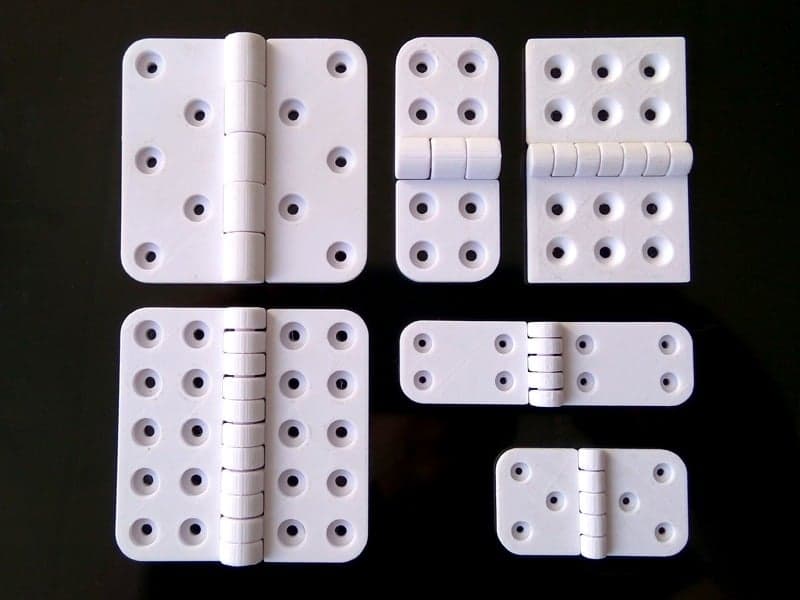
This is a parametric butt hinge designed in OpenSCAD, offering a wide range of parameters for customization. The hinge is designed to be printed in one step, but the individual leaves can be printed independently if desired. And in the case of applications that require an external pin, the default fused pin may be disabled, to leave a pin shaft ready to accept an external pin, during post printing assembly.
Note: In the event that the Thingiverse Customizer is not working, which happens from time to time, you can still open and edit Scad files directly in an Scad editor, like OpenSCAD.
Experimental Version: An experimental version of this model may be found here, https://www.thingiverse.com/thing:2351153 The experimental version includes additional features that are still being developed, or would otherwise over complicate the base model. I have made the experimental version available for those who would like to brave early access to some of the features that will possibly find there way into the base model, eventually. Please note, the experimental version is not updated as often as the base model, and may still include bugs and untested configurations.
Male Leaf Enabled Print the male leaf if true, otherwise omit it from the print.
Female Leaf Enabled Print the female leaf if true, otherwise omit it from the print.
Leaf Fillet Enabled Enable filleted leaf corners. Aside from aesthetic value, filleted corners can help with warping to a degree.
Pin Enabled By default, the hinge is designed to be printed in one go, with a hinge pin fused to the female leaf. However, there may be applications where one may prefer to use an external pin. For instance, in the case where a metal pin is preferred for the sake of strength. In applications where an external pin is to be used, the pin may be omitted from the female leaf, by setting Pin Enabled to false.
Pin Auto Size Enabled If true, this will set the pin diameter to the leaf gauge. If false, the pin diameter may be specified by the Pin Diameter parameter.
Pin Shaft Counterbore Enabled Cut a counterbore into the end caps of the knuckle joints if true. While the pin shaft counterbore may be added even when the internal fused pin is enabled, the primary purpose of the pin shaft counterbore is to allow what ever external pin or bolt is being used in the case of an external pin, to be set flush with the top and bottom edges of the hinge, in the case where the internal pin is disabled, i.e. Pin Enabled is false.
Fasteners Enabled Include fastener holes if true. If false, leave the leaves free of fastener holes.
Knuckle Gusset Type Select whether or not to use knuckle gussets, and if so what type. Knuckle gussets add strength to the transition between the knuckles and the leaves. The length of the knuckle gussets is equal to the fastener margin size, so that the gussets will never overlap any fastener holes. There are four styles of knuckle gusset to choose from. 1. None: No knuckle gussets. 2. Linear: Straight edge gusset projected from a tangent on the knuckle down to the fastener margin on the leaf. 3. Circular: Basically a simple fillet, tangential to both the knuckle cylinder and the surface of the leaf. 4. Parabolic: A vertex form parabola, tangential to the knuckle cylinder, with its turning point tangential to the surface of the leaf at the fastener margin.
Throw Angle The angle of the hinge joint. The hinge joint range is from +180 degrees fully closed, to -90 degrees fully opened. The default throw angle is 0 degrees, ie. opened flat. This can be used either for assembly analysis, or in the case where one wishes to print the hinge standing vertically, it can be used to set a partially closed angle to keep the hinge stable during printing. For vertical printing, an angle of 120 degrees should keep the hinge stable during printing. If you just want to print the hinge flat on the build plate, then keep the throw angle at 0 degrees for your printable model.
Flip Model Rotate the model 180 degrees about the z-axis. This is useful for viewing the top and bottom pin shaft counterbore parameters.
Resolution The geometric model resolution. Corresponds to the number of sides used to construct cylindrical parts of the model, like the knuckle joint segments, and the leaf fillets. For example, a Resolution of 8, would specify cylindrical component elements to be constructed from 8 sides. a Resolution of 32 would result in 32 sided cylindrical component elements, and so forth. For a smooth model, a Resolution of 64 and above is recommended. By default Resolution is set to 128.
Component Color This is used purely to color the model in the Thingiverse Customizer. It should not affect the color of the model, printed from a color printer.
Hinge Width The width in millimeters, of the entire hinge, from the outer edge of the left leaf, to the outer edge of the right leaf.
Leaf Height The height in millimeters, of the hinge along the knuckle joint axis.
Leaf Gauge Defines the thickness in millimeters, of the leaves and the radius of the knuckle joint.
Component Clearance The inter-component gap in millimeters. Recommended values range from 0.3mm for a tight fit, to 0.5mm for easy-er manipulation after printing. Clearance values of 0.3 or below can be challenging to print. I have succeeded in printing a few of these hinges with component clearances of 0.2mm and 0.25mm. However, quite often, sub 0.3mm clearance results in a locked up knuckle joint, where the leaves break before the hinge loosens up. A clearance of 0.4 or greater should release without to much trouble. Note: The more knuckle segments there are, the greater the initial joint friction strait off the build plate. So for higher knuckle counts (7 or greater), component clearances of 0.4 or higher, may be required. If the knuckle joint is not moving free at 0.4mm or higher, try re-printing slower at a higher resolution, in particular z resolution. Lower temperatures can help as well. For Pla, a resolution of x=0.3, y=0.3, and z=0.15, at a speed of 6mm/s or less, with temperature 190 degrees C, seems to support a component clearances of 0.3mm to 0.4mm relatively well. All of the sample Stl files in the Thing Files section, are set to 0.3mm component clearance.
Knuckle Count The number of knuckle segments in the knuckle joint. This number should be an odd number. For most applications, a knuckle count of 3 or 5 should suffice. However, higher knuckle counts can offer increases in strength relative to gauge size and hinge dimensions.
Pin Diameter Manually specified pin diameter. This value is only used by the model, if Pin Auto Size Enabled is set to false. If Pin Auto Size Enabled is true, then the pin diameter is automati
Источник: https://www.thingiverse.com/thing:2351153
Автор: rohingosling
Лицензия: Creative Commons - Attribution
Другие модели автора
Все модели
Скачать Параметрический шарнир — 3D-модель для печати на 3D-принтере
Скачать Параметрический шарнир — 3D-модель для печати на 3D-принтере. Файл загружен автором Katalog3D на маркетплейс Каталог3Д и доступен для скачивания в формате STL или 3MF.
Лицензия. Перед использованием ознакомьтесь с условиями лицензии в карточке модели. Одни файлы разрешают только личную печать, другие — коммерческое использование. Подробнее — в разделе лицензии.
Смотрите также: другие модели этого автора, похожие файлы по тегам — hinge, параметрические.