Обратная связь
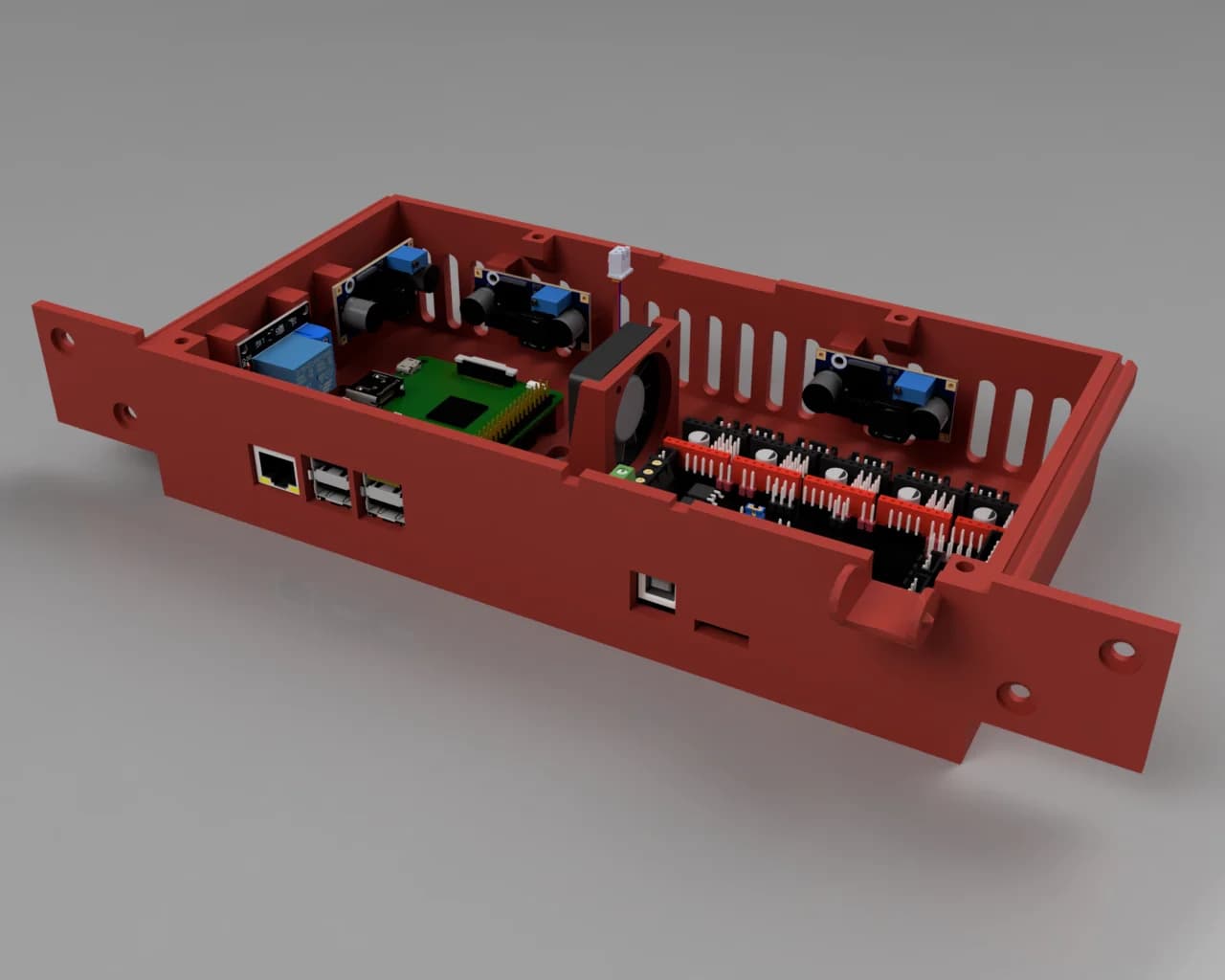
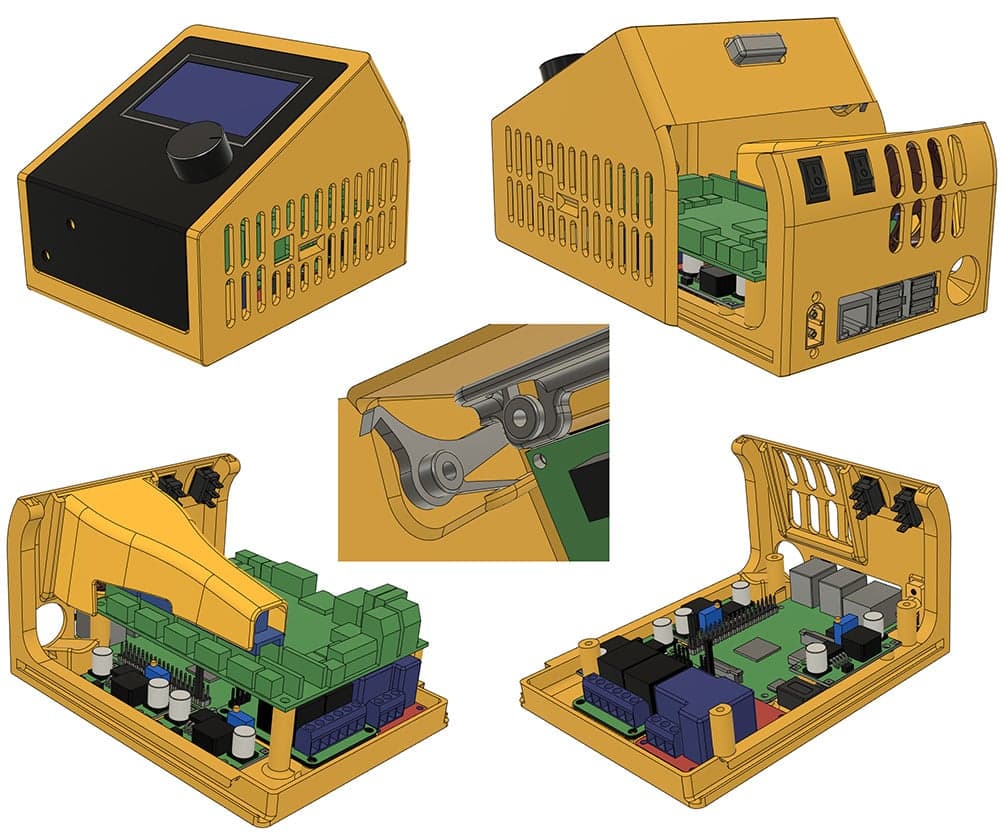
Ender 3 External Electronics Case V2 - This case is a two piece sliding design for easy access to wiring, with a push button quick release for fast toolless access. It is designed to fit as many components as possible in a small footprint to save on bench space. Short demonstration video: https://www.youtube.com/watch?v=4l3C41WNFsw It can accommodate an Skr V1.3, a Raspberry Pi 3B+, 3 buck converters, a two channel 10amp relay, a single channel 30amp relay, two KCD11 switches, an XT60E-M panel mount power connector, and has a modular fan duct to optimize cooling. Due to the packaging issues of having the larger Skr V1.3 board, a Raspberry Pi, and multiple additional modules, there is only a version with the cable port on the rear (no side port version available as on V1). Unfortunately as I have rewired my own printer with a longer wiring harness I cannot confirm if the stock wiring harness of the Ender 3 is long enough to be able to be used with minimal changes as was the case with V1. Update: (30 June 2020) Very small revision to the case bottom. Had to move something that didnt combine properly by literally 0.051mm. Didnt affect function at all, it just annoyed my perfectionism. Added a.Step file so people can customize the case for their own components. Update: (31 July 2020) This case is designed for an Skr V1.3, and the summary has always said this. It does not fit stock Creality boards or any stock dimension boards such as the Skr Mini E3. Update: (14 November 2020) Added wiring diagram image and text explanation of how the wiring works in my set up. Update: (14 November 2020) Added a remix of the fan duct with a cut out for the Ext connector. This connector isnt used by the standard Ender 3 Lcd, but some touchscreen mods need to use this connector. Printing Guide: - You will need to use support in a few places. Use touching build plate with an 80 degree angle. I recommend using tree supports. See the included pictures for the required areas. Bottom Case: On the bottom half of the case you Need to support the top of the slider channels. It is also a good idea to support the rear Io opening of the Raspberry Pi, as it is a reasonably long bridge. The Sd card opening on the bottom should be okay without supports, but they obviously dont hurt. The other areas should be fine, and you absolutely do not need supports for the fan grille area. Top Case: For best results print the top half of the case upside down (i.e. lcd screen flat to the bed). I advise against printing the top half of the case in an Lcd side up orientation (i.e. as it would sit on your bench once completed). I have tried this, and found that the two sides can move slightly during the long print, and when the rear bridges them together you can end up with a layer shift effect. If shifted inwards it not only looks bad, but it can also prevent the case from closing. You will Need to support two places: the Lcd lip at bed level, and the bottom (top when printing upside down) of the Lcd lip at the front of the case. I recommend using tree supports as the front supported area is quite high and narrow, and the larger base of tree supports will be more stable for the long print. You dont need to support the rear button hole, but it doesnt hurt. The cooling outlets do not need support. If your slicer is trying to add a massive amount of support material to support the sliders, then you didnt set your support angle to 80 degrees. Make sure the side with the cooling outlet is facing your part cooling fans air stream, as cooling is critical here. The overhang angles on the Sd card and Usb openings have a tendency to curl up if not adequately cooled. Support doesnt help with this. Other Parts: You need to print one duct, one button, two button retainers, two rockers, and two rocker pivots. Use a lot of walls/perimeters for the button bar, or even print it solid. The design may look bigger and stronger than it needs to be, but it actually bends quite a lot due to the resistance of the rocker springs. If it bends too much it wont actuate the rockers enough for the case to open. Similarly to the top half of the case, I suggest printing the fan duct orientated with the fan mounting face side of the duct facing your part cooling fan to prevent curling. Installation Guide: - Fasteners Required: 17x M2.5x6mm (or 5mm) These are for the Raspberry Pi, relays, and buck converters. Obviously you will need less than 17x if youre not installing everything. Only the Raspberry Pi and relays actually require M2.5 due to hole size and component clearances, but I chose to also use M2.5 for the buck convertors so that the lower level is all the same size, reducing the chance of accidentally ruining an M2.5 hole with an M3 screw if your brain takes a vacation. 2x M2.5x8mm These are for the XT60E-M connector. The case is designed to accommodate countersunk screws because they look nicer, but you can use any M2.5 screw that doesnt have a huge head that blocks the XT60 connector from plugging in. You can also use longer screws (but not shorter) if you dont have any 8mm on hand. 8x M3x10mm Four for the Skr, four for the latch components. You can also use 15mm for the Skr. I recommend saving that for if you accidentally strip the first 10mm of thread. 4x M3x12mm These are for the case fan. As its an uncommon size that you may not have on hand you can use longer screws (15-20mm) if needed. If using longer screws check that the bottom screw on the inside clears the Skrs EXP2 header, you can leave the screw out if it does not. Raspberry Pi: You will need a 90 degree Usb cable for powering the RPi. These are commonly (but not universally, so be careful) referred to as left angle. An example of what you want: EgZJSN.jpg Note the flat side of the connector facing up relative to the direction of the plug. Alternatively you can power the RPi by the Gpio pinheader, or a spliced 90 degree left angle Usb cable/adapter, using a buck converter tuned to 5volt. I know that powering the RPi like this isnt desirable for a lot of people. Earlier versions of the design had the Skr board turned 180 degrees so the Pi could be further to the side to make room for a straight micro Usb connector, but this pushed the wiring terminals of the Skr against the back wall of the case, making them very difficult to wire. As a core design goal of V2 was to make access to wiring easy (and indeed the reason for the two piece design) I decided to preference that. Power Connector: The case accommodates an XT60E-M panel mount socket for the XT60 connector to plug in to. Although I originally designed an XT60 clamp ala V1, I learned that newer Ender3s use a branded Amass XT60 connector (due to the crimping controversy), thus there are two different kinds of connectors used on different Ender 3s, which require different clamp designs. Using an XT60E-M accommodates everyone. 14 Awg (ga Источник: https://www.thingiverse.com/thing:4501568 Автор: MrClown Лицензия:
Опубликовано3/27/2026
Обновлено3/27/2026
Лицензияpersonal
ТипБесплатный

Скачать Корпус для внешней электроники Ender 3 V2 — 3D-модель для печати на 3D-принтере

Скачать Корпус для внешней электроники Ender 3 V2 — 3D-модель для печати на 3D-принтере. Файл загружен автором Katalog3D на маркетплейс Каталог3Д и доступен для скачивания в формате STL или 3MF.

Лицензия. Перед использованием ознакомьтесь с условиями лицензии в карточке модели. Одни файлы разрешают только личную печать, другие — коммерческое использование. Подробнее — в разделе лицензии.

Смотрите также: другие модели этого автора, похожие файлы по тегам — case, creality ender 3, Ender-3, коробки, Ender, Raspberry Pi, raspberry pi case, electronics enclosure, enclosure, skr 13, bigtreetech skr, external, SKR, SKR V13.